


Meal planner + grocery list

A meal planner that writes your grocery list for you

Pick recipes for the week and FoodyFoo builds the grocery list from them: every ingredient, grouped by store section, with the things you already have moved out of the way. No retyping recipes into a notes app.

  • Download FoodyFoo on the App Store
  • Get FoodyFoo on Google Play

Free to download for iPhone and Android. Optional Pro subscription. See pricing.

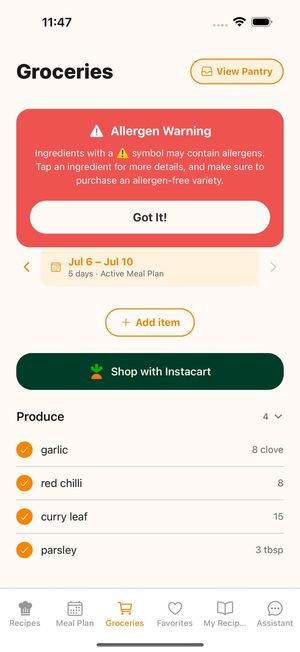
FoodyFoo Groceries screen: an allergen warning banner, the active meal plan dates, an Add item button, a Shop with Instacart button and produce items grouped by store section

How the plan becomes a list

  1. Choose your days. Start a plan for Mon–Fri, Mon–Sun, or the same days as your last plan.
  2. Add recipes to each meal. Breakfast, lunch, dinner or snacks, and more than one recipe per meal if you like. Leftovers can be scheduled as a meal too.
  3. Open Groceries. The ingredients from those recipes are already on your list, grouped by store section.
  4. Shop. Tick things off in the store, or untick what you don't need and send the rest to Instacart.

Plan the week first

Recipes come from the Edamam recipe database; search by keyword or browse popular and recommended recipes. When you're signed in, recipe search leaves out recipes labeled as containing the allergies you've saved. Keto, Paleo, Vegetarian, and Vegan diets narrow your recommended recipes, and dislikes help filter them. You can also add your own recipes to My Recipes.

With Pro you can schedule next week's plan alongside this one, so you can shop ahead, and see daily calorie, protein and fiber totals on your plan.
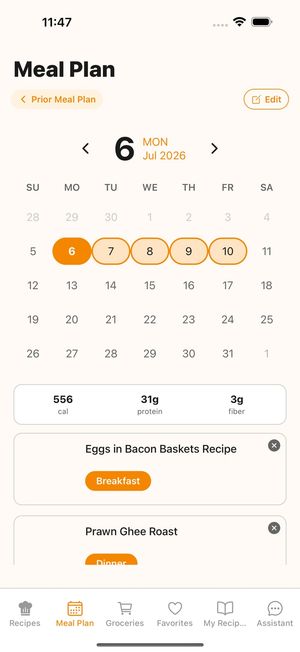

FoodyFoo Meal Plan screen: a calendar with Monday to Friday selected, daily calorie, protein and fiber totals (a Pro feature), and recipes scheduled for breakfast and dinner
Daily totals are a Pro feature.

Then shop from one organized list

  • Items are grouped by store section: Produce, Meat & Seafood, Dairy & Eggs, Bakery, Aisle Goods, Frozen, Beverages, Household, Personal Care, Pet, Baby, Health, and Other.
  • Add anything else you need, like coffee, paper towels or snacks, with the Add item button.
  • Keep a pantry. Items you already have move into an "In Pantry" section, so the list shows what you actually need to buy.
  • Ingredients that may contain one of your saved allergens may be flagged on the list. Allergen info comes from recipe data and may be incomplete. Ingredient lists and descriptions in the app may be reformatted by AI, and allergen flags may miss things. Always check the original recipe and product labels.
  • Free accounts can look back at your previous plan and its list; Pro keeps your full meal plan and grocery list history.
FoodyFoo Groceries screen: an allergen warning banner, the active meal plan dates, an Add item button, a Shop with Instacart button and produce items grouped by store section

Why plan first and list second

Most grocery lists get written from memory, and that's how the same jar of mustard ends up in the fridge three times. Building the list from a plan means it covers exactly the meals you intend to cook this week. Checking it against your pantry before you shop means you don't buy what's already in the cupboard.

For a step-by-step method, read our guide to building a pantry-first grocery list.

When you'd rather not go to the store, see how meal planning with Instacart works in FoodyFoo.

Get FoodyFoo, meals made easy!

Free to download on iPhone and Android. Optional Pro subscription.

  • Download FoodyFoo on the App Store
  • Get FoodyFoo on Google Play