


Family meal planner

One meal plan and grocery list for the whole household

Create a household in FoodyFoo and invite the people you cook for. Everyone sees the same meal plan and the same grocery list, so whoever's at the store knows what to buy.

  • Download FoodyFoo on the App Store
  • Get FoodyFoo on Google Play

Free to download for iPhone and Android. Optional Pro subscription. See pricing.

FoodyFoo Meal Plan screen: a calendar with Monday to Friday selected, daily calorie, protein and fiber totals (a Pro feature), and recipes scheduled for breakfast and dinner
Daily totals are a Pro feature.

How household sharing works

  1. Create a household. In FoodyFoo, open your Profile and go to Household. Creating a household requires FoodyFoo Pro.
  2. Invite people. Send an invite link, or share the invite code. Each invite is for one person and expires after 7 days. You can revoke an invite at any time.
  3. They join for free. The people you invite don't need Pro. They join with the link or code in their own FoodyFoo account.
  4. Plan and shop together. Everyone sees the household meal plan and grocery list.

Choose what each person can do

  • Owner: created the household and needs FoodyFoo Pro.
  • Full control: can edit the household meal plan. Up to 2 people can have full control, including the owner.
  • View-only: everyone else. They can see the plan and grocery list and suggest recipes, which the owner or a full-control member approves.

You can change someone's access, remove members, or hand over ownership later. If the owner's Pro ends, the household keeps working for a 14-day grace period, then pauses.
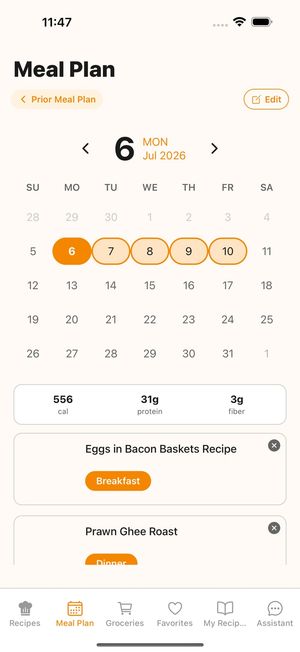
FoodyFoo Meal Plan screen: a calendar with Monday to Friday selected, daily calorie, protein and fiber totals (a Pro feature), and recipes scheduled for breakfast and dinner
Daily totals are a Pro feature.

A shared grocery list

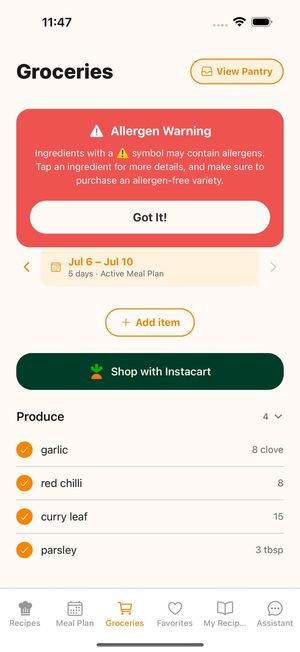
The household grocery list is built from the household meal plan, grouped by store section. Tick items off as you shop, or untick what you don't need and send the rest to Instacart.

FoodyFoo Groceries screen: an allergen warning banner, the active meal plan dates, an Add item button, a Shop with Instacart button and produce items grouped by store section

What's shared and what isn't

  • Shared: the household meal plan and grocery list. Recipes you add to My Recipes are visible to everyone in your household, with your name shown; only you can edit them.
  • Not shared: Favorites and subscription info aren't shared.
  • If you leave a household, its members can no longer see your recipes, and you can no longer see theirs.

The AI assistant can help plan for the household too, within your access level, and takes every member's saved allergies into account. Cooking around different food allergies? Read meal planning for different allergies and see allergy-aware meal planning.

Details are in our Privacy Policy.

Get FoodyFoo, meals made easy!

Free to download on iPhone and Android. Optional Pro subscription.

  • Download FoodyFoo on the App Store
  • Get FoodyFoo on Google Play