Please read: Allergen info comes from recipe data and may be incomplete. Ingredient lists and descriptions in the app may be reformatted by AI, and allergen flags may miss things. Always check the original recipe and product labels. FoodyFoo is a planning tool, not medical advice. Follow your doctor's or allergist's guidance.
Allergies recipe search can filter
Save any of these in your profile. When you're signed in, recipe search leaves out recipes labeled as containing the allergies you've saved.
Dairy
Egg
Fish
Shellfish
Tree Nut
Peanut
Gluten
Soy
Sesame
Mustard
Sulfite
You can also save Nightshade, but recipe search can't filter it because the recipe data has no nightshade label. If you're signed in, a recipe page may warn you that it could contain nightshades, but that check isn't complete, so check those recipes yourself.
How it works
FoodyFoo's recipes come from the Edamam recipe database, which labels recipes with allergen information. When you search, FoodyFoo asks only for recipes carrying the matching "free" label for each allergy you've saved. If a recipe doesn't carry that label, FoodyFoo treats it as possibly containing the allergen.
Keto, Paleo, Vegetarian, and Vegan diets narrow your recommended recipes, and dislikes help filter them. Recipe search itself filters on allergies only.
Flags on your grocery list
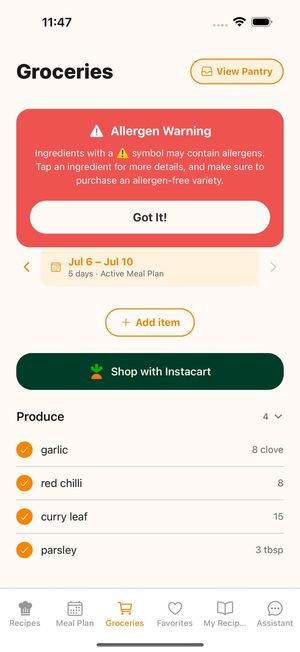
When an ingredient on your list may contain one of your saved allergens, FoodyFoo may flag it with a warning so you know to check the product label at the store. Flags can miss things, so read labels either way.
The AI assistant knows the allergies you've saved when it suggests recipes, but treat its suggestions as ideas and check the ingredients.