1. Plan your meals
Choose the days you're planning for and add recipes to breakfast, lunch, dinner or snacks. Search the Edamam recipe database, use your own recipes, or ask the AI assistant for ideas and have it add them to your plan.
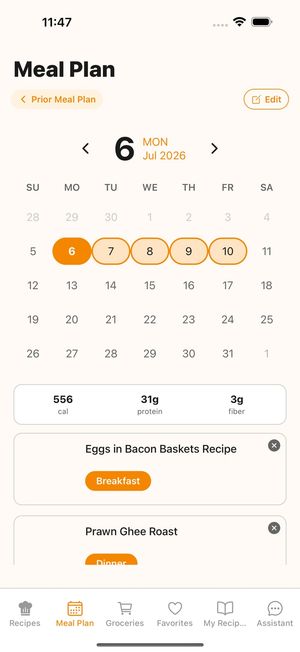

Meal planning + Instacart
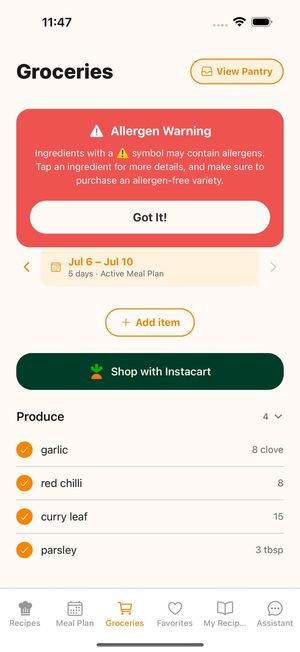
FoodyFoo turns your weekly meal plan into a grocery list. Untick anything you don't need, tap Shop with Instacart, and finish your order on Instacart for delivery or pickup where it's available.


Free to download for iPhone and Android. Optional Pro subscription. See pricing.
Choose the days you're planning for and add recipes to breakfast, lunch, dinner or snacks. Search the Edamam recipe database, use your own recipes, or ask the AI assistant for ideas and have it add them to your plan.
FoodyFoo builds the list from the recipes on your plan and groups it by store section. Add your own items, and use the pantry to keep track of what you already have.
Untick anything you don't need before sending, then tap Shop with Instacart. FoodyFoo sends the ticked items to Instacart, where you choose products and check out. Your list is named after your meal plan, and it opens in Instacart, where you pick the store.
Items you send are marked as purchased on your FoodyFoo list, so you can see what's still left to buy.
Plan the week and get a grocery list built from your recipes.
Share one meal plan and grocery list with your household.
Save allergies so recipe search leaves out recipes labeled with them.
See what's free and what FoodyFoo Pro adds.
Free to download on iPhone and Android. Optional Pro subscription.